
How We Grew a New Website from Zero to 50,000 Monthly Impressions
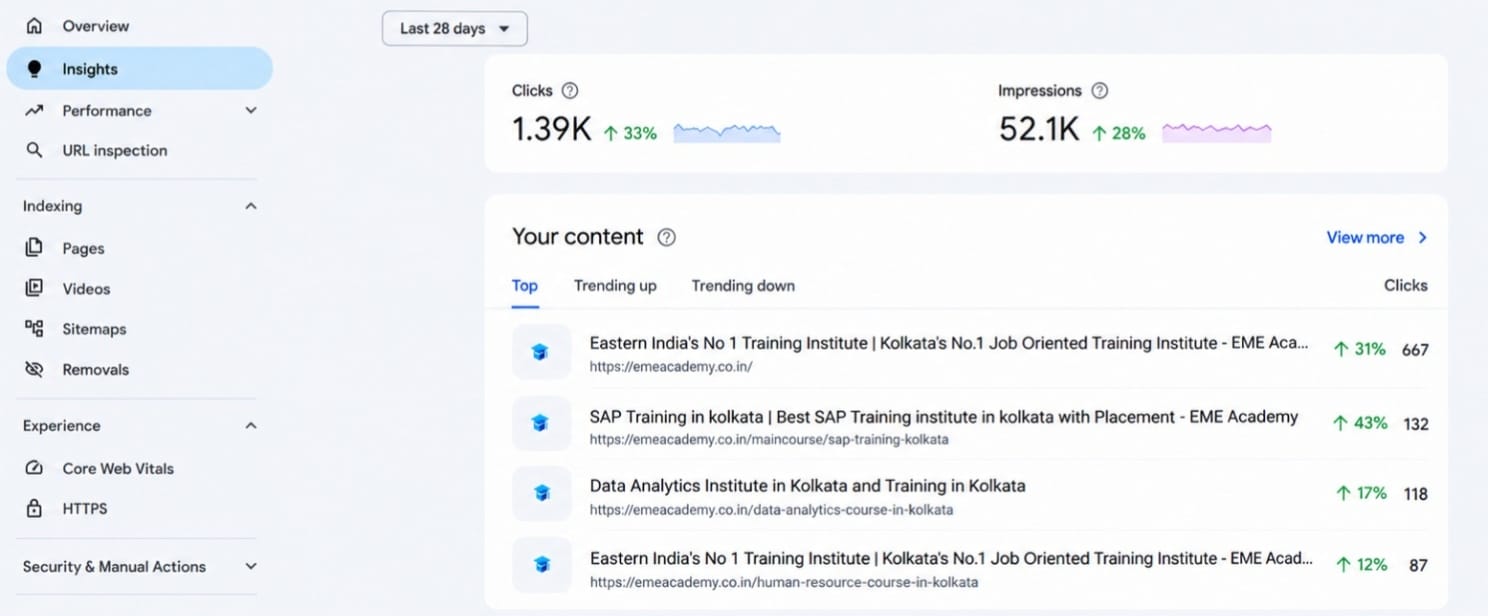
Many people think a new website must wait a year before Google notices it. Our experience was different. In this SEO case study new website example, we grew a Kolkata training institute website to 52,100 impressions and 1,390 clicks in 28 days. We used no paid ads and bought no backlinks.
Every number in this post comes from Google Search Console (GSC). We also share our mistakes and a recent traffic dip, because a real case study should show the full picture.
Key Takeaways
• The site earned 52,100 impressions, 1,390 clicks and a 2.7% CTR in 28 days.
• The average position was 9.4, which is near the bottom of page one.
• Every page targeted one course and one city.
• The homepage brought 48% of all clicks, which is a risk we are fixing now.
• Clicks fell 33% against the previous 28 days, and we explain why we are not hiding it.
Quick Results of Our SEO Case Study
These numbers come from GSC (Web search type) for the last 28 days, from 6 September to 3 October 2026.
| Metric | Result |
| Total impressions | 52,100 |
| Total clicks | 1,390 |
| Average CTR | 2.7% |
| Average position | 9.4 |
| Average daily impressions | About 1,860 |
| Average daily clicks | About 50 |
| Monthly impressions at launch | 0 |
An average position of 9.4 means the site appears near the bottom of page one. That is a strong base for a local website. It also shows where we can still improve.
What Impressions Really Mean
An impression counts each time your page appears in Google results. It does not mean someone clicked.
We track impressions first because they come before clicks. If Google does not show your page, nobody can click it. For a new site, rising impressions are the earliest sign of trust from Google. Clicks follow when your titles and rankings improve.
In our case, 52,100 impressions gave 1,390 clicks. That is a 2.7% click-through rate (CTR). We explain how we plan to raise it later in this post.
About the Website We Used
The website is EME Academy (emeacademy.co.in), a job-oriented training institute in Kolkata. It teaches SAP, data analytics and HR courses.
We chose this project because most beginners face the same problem: a local business, a small budget and strong competitors. If that sounds like you, start with our guide on how to rank a new website fast.
Our team has worked on 16 SEO projects across education, training and local business websites. This post comes from hands-on work, not from a tool report.
Step 1: We Picked a Narrow Topic and a City
We skipped broad terms like “training institute” or “online courses.” Instead, each page targeted one course plus one city. Examples are SAP training in Kolkata, data analytics course in Kolkata and HR course in Kolkata.
Why does this work? Broad terms put a new site against national brands. A course and city pair puts you against a small group of local rivals. It also tells Google exactly who the page is for.
This is the idea behind topical authority. A site that covers one area deeply earns more trust than a site that covers many areas lightly. You can learn more in our guide on topical authority for new websites.
There is one trade-off. A narrow focus means a smaller audience. We accepted that, because a small audience that finds you beats a big audience that never does.
Step 2: We Found Low Competition Keywords
Keyword research shaped most of our result. We used Semrush / Ahrefs / free tools with these filters:
Keyword research shaped most of our result. We used Semrush and free tools with these filters:
| Filter | Value we used | Why |
|---|---|---|
| Keyword difficulty | Below 30 | New sites cannot beat strong domains yet |
| Monthly volume | 50 to 1,000 | Enough demand, less competition |
| Intent | One course or one clear need | Easy to match with one page |
| Top 10 check | At least 2 weak or small sites | Proof that a new site can win |
Most beginners skip the last filter. A low difficulty score can still hide strong pages. So we opened the results by hand and asked three questions:
1. Is the top result outdated?
2. Does it miss real details like syllabus, fees, batch timing or placements?
3. Can we add something the page does not have?
We kept a keyword if at least two answers were yes. This is how we added information gain. It simply means giving readers something useful that other pages do not offer.
Long-tail keywords helped here too. A longer phrase has fewer searches. But the person searching knows exactly what they want.
Keyword patterns we targeted:
1. SAP training in Kolkata
2. Data analytics course in Kolkata
3. HR course in Kolkata
4. Generative Ai Course in Kolkata
5. Data Science Course in Kolkata
Step 3: We Mapped Keywords by Search Intent
Search intent is the reason behind a search. We grouped every keyword into one of four types:
| Intent type | What the user wants | Page format we used |
| Informational | To learn about a skill or career | Blog post |
| Comparison | To choose between courses | Comparison post |
| Course search | To find and join a course | Course landing page |
| Brand search | To find the institute | Homepage |
Each keyword went to exactly one page. Two pages for one keyword compete with each other. We explain this in the mistakes section.
Step 4: We Built a Clear Page Structure
We built a homepage, one page per course and supporting content around them. Each course page covered one course in depth. Related pages linked to each other.
| Page type | Count | Example |
|---|---|---|
| Homepage | 1 | Main institute page |
| Course landing pages | 8 | SAP training in Kolkata |
| Supporting blog posts | 6 | How to choose a data analytics course in Kolkata |
This setup helps students move from learning to joining. It also shows Google that the site covers the topic fully. To copy it, read how to build SEO content clusters and plan your site architecture first.
Step 5: Our On-Page and Technical Setup
Good content can still fail if the basics are weak. Every page followed this checklist:
• Fast loading speed (see how to improve website speed)
• One H1 and a clear heading order
• Primary keyword in the title, first paragraph and one subheading
• Short, clean URLs
• Hand-written meta title and description in Rank Math
• Original images with useful alt text
• Mobile-friendly layout, because most students search on phones
• XML sitemap submitted in Search Console
We used Google’s SEO Starter Guide as our base. Then we used the Rank Math test checklist as a final check. A green score helps, but we wrote for students first.
Need a full list? Use our SEO audit checklist.
Step 6: How We Built Experience and Trust (EEAT)
Google looks for experience, expertise, authoritativeness and trust. This is called EEAT. It matters more for education sites, because students make career and money decisions from what they read.
• Experience: We used real course details, batch information and student questions.
• Expertise: Pages were reviewed by the trainers who teach each course.
• Authority: We linked to trusted sources and kept every claim accurate.
• Trust: We added contact details, an About page and a visible updated date.
For more on this, read our post on the future of SEO, EEAT and AI experience.
Step 7: We Got Pages Indexed Fast
A page that is not indexed gets zero impressions. After publishing, we used the URL Inspection tool in GSC and requested indexing. We also linked each new page from at least 2 older pages.
Are your pages stuck as “Discovered, currently not indexed”? Our guide on how to get your website indexed on Google covers the common fixes.
What the Data Tells Us
The GSC Insights report shows which pages bring the most clicks. These are our top four pages for the last 28 days:
| Page | Clicks | Change vs previous 28 days |
| Homepage | 667 | Down 31% |
| SAP training in Kolkata | 132 | Down 43% |
| Data analytics institute in Kolkata | 118 | Down 17% |
| HR course in Kolkata | 87 | Up 12% |
Three things stand out:
1. The homepage brings 48% of all clicks (667 of 1,390). Brand and general searches do most of the work.
2. The top four pages bring about 72% of all clicks. If one page drops, the whole graph drops.
3. The HR course page is growing while the others fall. We are studying its structure, internal links and content depth.
You only find insights like these when you read your own data.
The Recent Dip and What We Are Doing About It
Compared with the previous 28 days, clicks are down 33% and impressions are down 28%. The daily graph also shows a sharp fall in clicks in the last few days.
We are not hiding this. Every real website has ups and downs. Here is how we check the cause:
1. Compare date ranges in GSC and find which queries lost impressions.
2. Check position changes for top pages, especially the SAP page.
3. Look at seasonality. Education searches change with admission cycles and exam seasons.
4. Review competitors that moved above us.
5. Check technical health, such as indexing, speed and new errors.
One good month is not a result. A system you review every two weeks is.
How We Use GSC to Grow Faster
Search Console is our main growth tool. Our routine takes about [ADD: time] every two weeks:
1. Open the Performance report and filter the last 28 days.
2. Find queries with an average position between 8 and 20.
3. Check the page that ranks for each query.
4. Improve the title, add a missing section and add internal links.
5. Request indexing again.
Pages in this range are close to page one. Small changes can bring quick gains, and this is faster than writing a new page from zero.
We also look for queries with high impressions and low CTR. With a 2.7% CTR, we know there is room to grow. A better title and meta description can turn the same impressions into more clicks. Our advanced GSC filters guide shows the exact filters. Google’s Performance report help page explains each metric.
Month-Wise Growth
| Month | Impressions | Clicks | What we did |
|---|---|---|---|
| 1 | 3,200 | 85 | Setup, keyword research |
| 2 | 12,500 | 310 | First course pages |
| 3 | 27,800 | 690 | Internal linking, indexing fixes |
| 4 | 40,700 | 1,045 | Page updates using GSC data |
| Latest 28 days | 52,100 | 1,390 | Ongoing review |
The early months looked slow. That is normal. Google tests a new site slowly before showing it to more people. Do not judge a site in the first 60 days. Judge the direction of the graph.
Mistakes We Made (and What We Learned)
| Mistake | What happened | How we fixed it |
|---|---|---|
| Two pages targeting the same keyword | Both pages competed with each other and rankings kept moving up and down | Merged them into one stronger page and gave each page its own keyword |
| Too much reliance on the homepage | Almost half of all clicks came from one page | Building stronger course and blog pages |
| Weak page titles and descriptions | Pages got impressions but very few clicks | Rewrote titles and descriptions using real search queries from GSC |
Our biggest lesson: One page should have one clear purpose and one main keyword. Regularly checking GSC data and improving pages is what gives steady growth.
Also avoid targeting one keyword with two pages. They fight each other. Read about keyword cannibalization to prevent it.
What We Would Do Differently
If we started again today, we would change three things:
• Build more supporting pages around each course early, so traffic is spread out
• Improve titles and meta descriptions sooner to lift CTR above 2.7%
• Plan one keyword per page from day one, so pages never compete with each other.
• Start internal linking from the first week. Add links as pages are published instead of fixing it later.
• Review GSC data every week from the start, instead of waiting until later to use it for page updates.
This Case Study Is Not a Guarantee
Every website is different. Your niche, budget, content quality and competition will change your result. Treat our numbers as one real example, not a promise.
Google says it rewards helpful, people-first content. You can read more in its guide on creating helpful content. Quality matters more than any trick.
Also, most pages never get search traffic. Ahrefs showed this in its study of search traffic. That is why keyword choice and search intent come before writing.
A Simple Checklist You Can Copy
• Pick one narrow topic where you have real experience
• Add a city if you run a local business
• Find 30 to 40 low competition keywords
• Check the real top 10 results by hand
• Give each keyword one page only
• Build one main page and several supporting pages
• Add original details, screenshots or data to every page
• Link related pages to each other
• Add author name, bio and updated date
• Submit your sitemap and request indexing
• Review GSC every two weeks
• Update pages ranking in positions 8 to 20
Need Help With Your New Website?
Want a plan like this for your own site? Our team can help. We start with an SEO audit to find quick wins and gaps. Then we build a keyword and content plan for your niche. See all our SEO services in Delhi or contact us for a free discussion.
Frequently Asked Questions
How long does SEO take for a new website?
Most new websites need 4 to 6 months to see steady impressions. Steady clicks often take 6 to 12 months. In our case, it took [ADD: X] months. The time depends on your niche, competition and content quality.
Can a new website rank without backlinks?
Yes, for low competition keywords where current results are weak. Backlinks matter more when you target harder keywords later.
How many pages does a new website need?
There is no fixed number. Ten focused pages usually beat fifty random ones. Build pages that match real search intent.
What is a good CTR for a new website?
Our site has a 2.7% average CTR at an average position of 9.4. CTR depends on position. Pages in the top three results usually get a much higher CTR than pages at the bottom of page one.
Are impressions the same as traffic?
No. Impressions show how often your page appeared in search. Traffic means clicks. Better titles, clear meta descriptions and higher rankings turn impressions into clicks.
Why do impressions and clicks drop sometimes?
Common reasons are seasonality, new competitors, algorithm updates and technical issues. Compare date ranges in GSC and check queries and pages before you change anything.
Which tools did you use?
We used Semrush / Ahrefs, Google Search Console and Rank Math. Free tools are enough to begin.
Final Thoughts
This SEO case study new website example shows that a new site can pass 52,000 monthly impressions. A narrow topic, a clear city, smart keywords, strong trust signals and regular GSC reviews made the difference. The recent dip is a reminder to keep watching your data and keep improving.
Start small, track your numbers and review them every month. If you want expert help, we are one message away.